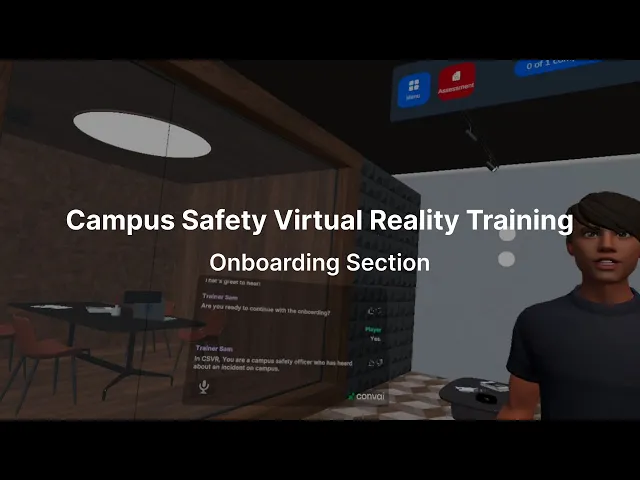
Campus Safety Virtual Reality Training Program
Campus Safety Virtual Reality Training Program
Designing VR Onboarding for Independent Campus Safety Training
Designing VR Onboarding for Independent Campus Safety Training
CONTENT
OVERVIEW
OVERVIEW
Training new campus safety officers often requires hands-on instruction and practice responding to real-world situations. Campus Safety Virtual Reality (CSVR) was developed at PUSH Studio in partnership with DePaul University Public Safety to help officers practice incident response through immersive VR simulations.
As the UX/UI Designer, I designed a pre-training onboarding experience, planned usability testing, and synthesized findings to improve how officers enter and navigate the VR training system.
Campus Safety Virtual Reality (CSVR) is a training program created at PUSH Studio in partnership with DePaul University’s Public Safety department. CSVR helps new officers practice handling campus incidents through role playing VR simulations, but it requires a PUSH Studio technologist to administer each session. This limits when and how often officers can train.
To address this, we created a pre-training onboarding experience that explains the controller, UI, and the officer’s role in the simulation so officers can enter and complete training independently.
Team:
Team
Team
I collaborated with another UX Researcher, VR Developer, and Public Safety Director.
I collaborated with another UX Researcher, VR Developer, and Public Safety Director.
Methods:
Methods
Methods
Instructional Design, and Usability Testing.
Instructional Design, and Usability Testing.
Tools:
Tools
Tools
Figma, FigJam, and Google Sheets.
Figma, FigJam, and Google Sheets.
Duration:
Duration
Duration
4 weeks
4 weeks
Impact
Impact
The project showed how learner-centered onboarding can build confidence for first-time VR users and support independent training, while also revealing technical and implementation constraints that shape how immersive learning systems must be designed and evaluated.
The project showed how learner-centered onboarding can build confidence for first-time VR users and support independent training, while also revealing technical and implementation constraints that shape how immersive learning systems must be designed and evaluated.
PROBLEM SPACE
PROBLEM SPACE
CSVR training sessions depended on technical staff, limiting how often officers could practice.
CSVR training sessions depended on technical staff, limiting how often officers could practice.
The CSVR system allows officers to practice interviewing virtual characters and responding to campus incidents. However, each training session required a PUSH Studio technologist to administer the system and guide officers through setup and interaction.
This dependency meant officers could only train when technical staff were available, creating a barrier to frequent practice.
The CSVR system allows officers to practice interviewing virtual characters and responding to campus incidents. However, each training session required a PUSH Studio technologist to administer the system and guide officers through setup and interaction.
This dependency meant officers could only train when technical staff were available, creating a barrier to frequent practice.
Central Question:
How might we design an onboarding experience that prepares officers to use CSVR independently?
Central Question:
How might we design an onboarding experience that prepares officers to use CSVR independently?
IDENTIFY KEY TOPICS
IDENTIFY KEY TOPICS
Understanding first-time friction revealed three moments where new users needed guidance.
Understanding first-time friction revealed three moments where new users needed guidance.
To understand where officers might struggle, I tested the VR system as a first-time user. This walkthrough surfaced three areas where onboarding needed to provide clarity.
To understand where officers might struggle, I tested the VR system as a first-time user. This walkthrough surfaced three areas where onboarding needed to provide clarity.
Physical device:
Physical device
Physical device
How to use and practice the controller trigger.
How to use and practice the controller trigger.
In-simulation UI:
In-simulation UI
In-simulation UI
Where to find the menu, interview checklist, assessment button, and progress bar.
Where to find the menu, interview checklist, assessment button, and progress bar.
Training goal:
Training goal
Training goal
What officers are expected to do once the simulation begins.
What officers are expected to do once the simulation begins.
These insights helped define the structure and content of the onboarding experience.
These insights helped define the structure and content of the onboarding experience.
EXPERIENCE DESIGN
EXPERIENCE DESIGN
Designing a guided onboarding flow to help transition users to independent training.
Designing a guided onboarding flow to help transition users to independent training.
I mapped the onboarding flow and drafted the narrative. The design included the three critical onboarding sections and followed the intended ideal flow.
I mapped the onboarding flow and drafted the narrative. The design included the three critical onboarding sections and followed the intended ideal flow.
Simplified Onboarding Flowchart
Simplified Onboarding Flowchart
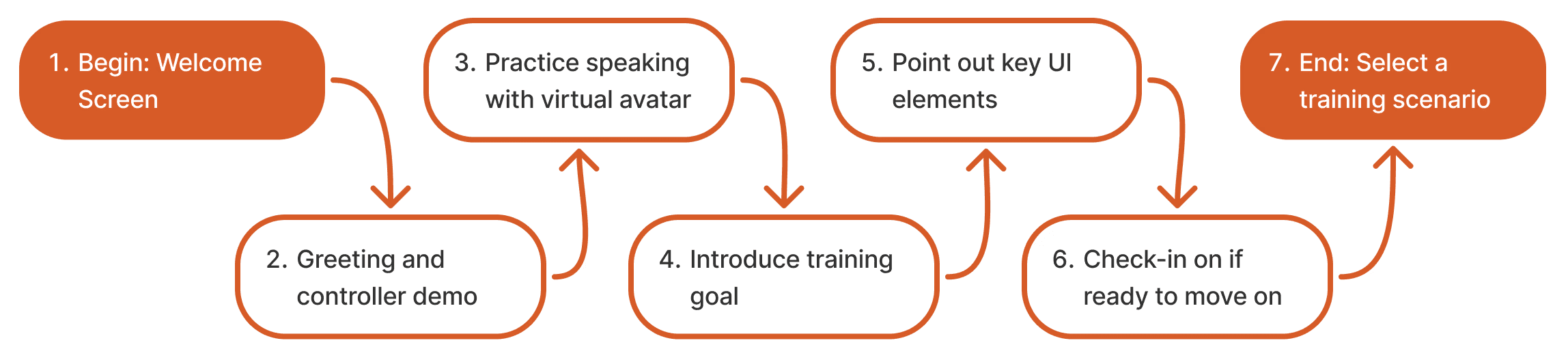
This progression allows officers to practice interactions and understand the interface before entering the simulation, supporting a smoother transition into training.
This progression allows officers to practice interactions and understand the interface before entering the simulation, supporting a smoother transition into training.
DESIGN APPROACH
DESIGN APPROACH
Applying key learner-centered design principles to create an impactful VR onboarding experience.
Applying key learner-centered design principles to create an impactful VR onboarding experience.
Because officers were learning both VR interaction and training tasks at the same time, I applied learner-centered design principles to reduce cognitive load.
Because officers were learning both VR interaction and training tasks at the same time, I applied learner-centered design principles to reduce cognitive load.
Personalization
Personalization
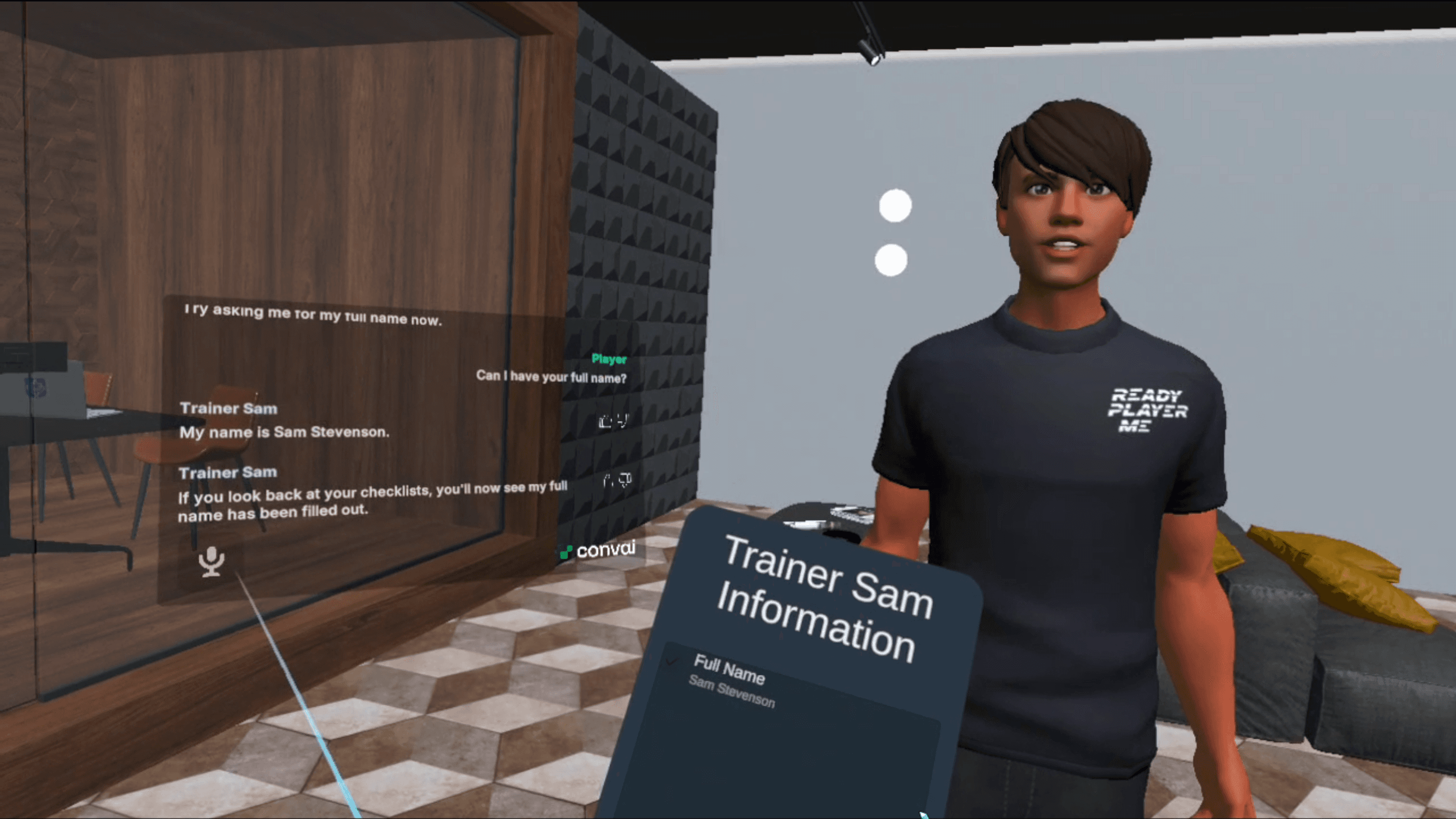
A virtual onboarding avatar, Trainer Sam, guides the experience using conversational dialogue.
A virtual onboarding avatar, Trainer Sam, guides the experience using conversational dialogue.
Practice
Practice
Users rehearse key actions before entering the training scenario.
Users rehearse key actions before entering the training scenario.
Signaling
Signaling
Trainer Sam gestures toward interface elements to help users locate controls quickly in the VR environment.
Trainer Sam gestures toward interface elements to help users locate controls quickly in the VR environment.
These techniques helped frame onboarding as a guided learning experience rather than a technical setup process.
These techniques helped frame onboarding as a guided learning experience rather than a technical setup process.
IMPLEMENTATION TWIST
IMPLEMENTATION TWIST
A late interaction change during development introduced unexpected usability challenges.
A late interaction change during development introduced unexpected usability challenges.
The handoff document included a complete flow chart with step by step descriptions and suggested character dialogue. Trainer Sam was created in ConvAI and imported into Unity.
The handoff document included a complete flow chart with step by step descriptions and suggested character dialogue. Trainer Sam was created in ConvAI and imported into Unity.
Unexpected Challenge
Unexpected Challenge
During implementation, the VR developer temporarily changed the speaking trigger from the A button on the controller to a microphone icon in the transcript window. This did not add steps, but it made speaking more difficult because users had to locate and select a small UI element each time. This change also prevented us from implementing controller trigger guidance as planned.
In addition, time constraints prevented us from adding automatic greetings and signaling cues. Despite these gaps, we proceeded with testing to evaluate the core onboarding experience.
During implementation, the VR developer temporarily changed the speaking trigger from the A button on the controller to a microphone icon in the transcript window. This did not add steps, but it made speaking more difficult because users had to locate and select a small UI element each time. This change also prevented us from implementing controller trigger guidance as planned.
In addition, time constraints prevented us from adding automatic greetings and signaling cues. Despite these gaps, we proceeded with testing to evaluate the core onboarding experience.
USER TESTING
USER TESTING
User testing showed onboarding built confidence but some users still needed guidance.
User testing showed onboarding built confidence but some users still needed guidance.
We conducted moderated usability testing with 10 campus safety officers, who had an average of 4.5 years of field experience. Participants completed onboarding and then continue into a training scenario.
We observed how they navigated the VR environment after onboarding and interviewed them about their impressions.
We conducted moderated usability testing with 10 campus safety officers, who had an average of 4.5 years of field experience. Participants completed onboarding and then continue into a training scenario.
We observed how they navigated the VR environment after onboarding and interviewed them about their impressions.
Key Findings
Key Findings
All participants successfully completed onboarding.
All participants successfully completed onboarding.
9 out of 10 officers reported feeling confident using the system independently.
9 out of 10 officers reported feeling confident using the system independently.
However, only half continued training without assistance.
However, only half continued training without assistance.
Most challenges occurred when participants tried to locate the menu, progress indicator, and assessment interface.
Most challenges occurred when participants tried to locate the menu, progress indicator, and assessment interface.
Participant 4
“Trainer Sam is the GOAT! He was informative and helpful.”
Participant 4
“Trainer Sam is the GOAT! He was informative and helpful.”
Testing Video Demoing Onboarding
Testing Video Demoing Onboarding
Limitations
Limitations
Inconsistent performance
Inconsistent performance
ConvAI bugs caused lag and interruptions, which may have contributed to participants needing help.
ConvAI bugs caused lag and interruptions, which may have contributed to participants needing help.
Implementation gaps
Implementation gaps
Missing features required verbal guidance, limiting our ability to fully evaluate independent use.
Missing features required verbal guidance, limiting our ability to fully evaluate independent use.
FUTURE OPPORTUNITIES
FUTURE OPPORTUNITIES
Testing insights identified opportunities to strengthen onboarding clarity and system independence.
Testing insights identified opportunities to strengthen onboarding clarity and system independence.
Insights from testing informed several priorities for future development.
Insights from testing informed several priorities for future development.
Improve system stability by exploring alternative AI character platforms.
Implement automatic greetings, stronger UI signaling, and controller guidance.
Revert the speaking interaction to the controller’s A button.
Add an ask-for-help option during training scenarios.
These improvements would further support the goal of independent training without technical support.
These improvements would further support the goal of independent training without technical support.
CONCLUSION
CONCLUSION
Learner-centered onboarding helped officers confidently enter VR training while revealing constraints of immersive systems.
Learner-centered onboarding helped officers confidently enter VR training while revealing constraints of immersive systems.
Impact
Impact
This project demonstrated that learner-centered onboarding can make immersive training systems more approachable and help first-time users confidently enter VR simulations. At the same time, the work revealed how technical performance and implementation constraints can shape the effectiveness of interactive learning experiences.
This project demonstrated that learner-centered onboarding can make immersive training systems more approachable and help first-time users confidently enter VR simulations. At the same time, the work revealed how technical performance and implementation constraints can shape the effectiveness of interactive learning experiences.
Retrospective
Retrospective
If I could do it again, I would push to implement the complete onboarding design before testing, especially automatic greetings, stronger signaling cues, and controller guidance. Resolving these gaps earlier would have allowed us to better evaluate true independent system use. The project also reinforced the importance of advocating for design intent and collaborating closely with engineering when working with emerging technologies like VR.
If I could do it again, I would push to implement the complete onboarding design before testing, especially automatic greetings, stronger signaling cues, and controller guidance. Resolving these gaps earlier would have allowed us to better evaluate true independent system use. The project also reinforced the importance of advocating for design intent and collaborating closely with engineering when working with emerging technologies like VR.