Augmented Reality Campus Tour Mobile Design
Augmented Reality Campus Tour Mobile Design
Reimagining Campus Exploration Through Augmented Reality
Reimagining Campus Exploration Through Augmented Reality

CONTENTS
OVERVIEW
OVERVIEW
Campus tours are often time-limited and one-size-fits-all, making it difficult for prospective students to imagine life on campus. The Augmented Reality Campus (ARC) project explored how augmented reality could support self-guided campus exploration at DePaul University.
As Project Lead, I led a four-person cross-disciplinary team and directed the end-to-end design of a mobile AR experience using Google’s Geospatial and ARCore technologies.
Campus tours are often time-limited and one-size-fits-all, making it difficult for prospective students to imagine life on campus. The Augmented Reality Campus (ARC) project explored how augmented reality could support self-guided campus exploration at DePaul University.
As Project Lead, I led a four-person cross-disciplinary team and directed the end-to-end design of a mobile AR experience using Google’s Geospatial and ARCore technologies.
Team:
Team
Team
I collaborated with another UX/UI Designer, an AR Developer, and a 3D Designer.
I collaborated with another UX/UI Designer, an AR Developer, and a 3D Designer.
Methods:
Methods
Methods
Persona Creation, Journey Mapping, Prototyping, and User Testing.
Persona Creation, Journey Mapping, Prototyping, and User Testing.
Tools:
Tools
Tools
Figma, FigJam, Adobe Photoshop, Notion, and Zoom.
Figma, FigJam, Adobe Photoshop, Notion, and Zoom.
Duration:
Duration
Duration
13 weeks
13 weeks
Impact
Impact
The project showed how location-based AR experience can make campus exploration more personal and engaging, while revealing geospatial limitations that shape how outdoor AR experiences must be designed and tested.
The project showed how location-based AR experience can make campus exploration more personal and engaging, while revealing geospatial limitations that shape how outdoor AR experiences must be designed and tested.
PROBLEM SPACE
PROBLEM SPACE
Prospective students struggle to understand campus life through traditional tours.
Prospective students struggle to understand campus life through traditional tours.
Campus tours are often time-limited and follow a fixed route, making it difficult for prospective students to explore campus at their own pace or gain a deeper sense of student life. While augmented reality can deliver contextual information directly in the environment, it was unclear how AR could meaningfully support campus exploration experience.
Campus tours are often time-limited and follow a fixed route, making it difficult for prospective students to explore campus at their own pace or gain a deeper sense of student life. While augmented reality can deliver contextual information directly in the environment, it was unclear how AR could meaningfully support campus exploration experience.
Central Question:
How might we use augmented reality to support exploratory, personal, and interactive campus tour experiences?
Central Question:
How might we use augmented reality to support exploratory, personal, and interactive campus tour experiences?
AUDIENCE
AUDIENCE
We focused the experience on prospective students to keep the AR concept feasible and relevant.
We focused the experience on prospective students to keep the AR concept feasible and relevant.
I began by reviewing findings from a student-led co-design session with campus tour guides. The session identified 3 potential audiences: prospective students, parents, and current students.
I began by reviewing findings from a student-led co-design session with campus tour guides. The session identified 3 potential audiences: prospective students, parents, and current students.
To maintain focus and feasibility, I prioritized prospective students and defined 5 core features for the experience.
To maintain focus and feasibility, I prioritized prospective students and defined 5 core features for the experience.
Building Information:
Building Information
Building Information
Short snippets highlighting each building.
Short snippets highlighting each building.
Internal Resources:
Internal Resources
Internal Resources
Visual cues showing building amenities.
Visual cues showing building amenities.
Statue Information:
Statue Information
Statue Information
Brief facts about campus landmarks.
Brief facts about campus landmarks.
Safety Feature:
Safety Feature
Safety Feature
Signals marking campus safety call boxes.
Signals marking campus safety call boxes.
Shuttle Stops:
Shuttle Stops
Shuttle Stops
Markers showing inter-campus shuttle locations.
Markers showing inter-campus shuttle locations.
EXPERIENCE STRATEGY
EXPERIENCE STRATEGY
Designing ARC as both a tour companion and a self-guided exploration tool reflected how prospective students actually explore campus.
Designing ARC as both a tour companion and a self-guided exploration tool reflected how prospective students actually explore campus.
Prospective students often participate in a guided campus tour and then continue exploring on their own.
Based on this insight, I defined ARC as both:
Prospective students often participate in a guided campus tour and then continue exploring on their own.
Based on this insight, I defined ARC as both:
a campus tour companion
a campus tour companion
a self-guided exploration tool
a self-guided exploration tool
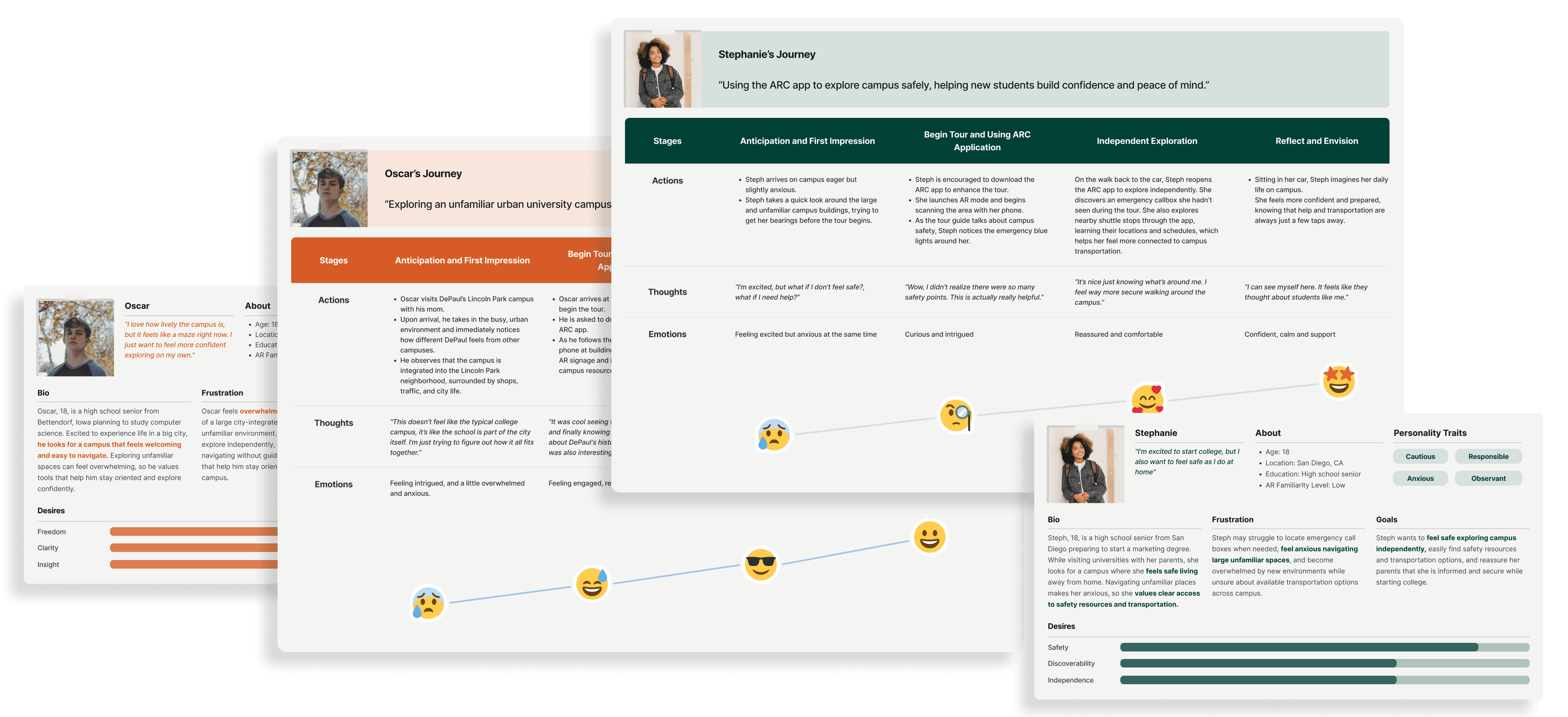
To ground early design decisions, we created two personas and journey maps as a starting point to capture the emotional and informational needs of prospective students. This helped ensure the experience supported both structured tours and independent exploration.
To ground early design decisions, we created two personas and journey maps as a starting point to capture the emotional and informational needs of prospective students. This helped ensure the experience supported both structured tours and independent exploration.
INTERACTION RESEARCH
INTERACTION RESEARCH
Studying existing AR navigation patterns helped identify interaction components that make spatial information understandable.
Studying existing AR navigation patterns helped identify interaction components that make spatial information understandable.
To understand how AR experiences communicate information in physical environments, I reviewed several sources:
To understand how AR experiences communicate information in physical environments, I reviewed several sources:
AR tour examples from web research
AR tour examples from web research
DePaul’s existing virtual campus tour
DePaul’s existing virtual campus tour
Google’s 3D Maps experience
Google’s 3D Maps experience
I tested Google’s 3D Maps firsthand to observe how spatial cues and interaction patterns guide exploration.
The findings from these sources were synthesized into a mood board that helped define the visual and interaction direction for the experience.
I tested Google’s 3D Maps firsthand to observe how spatial cues and interaction patterns guide exploration.
The findings from these sources were synthesized into a mood board that helped define the visual and interaction direction for the experience.

From this exploration, I identified four key interface components:
From this exploration, I identified four key interface components:
Map Markers:
Map Markers
Map Markers
Floating icons highlighting interactive points of interest.
Floating icons highlighting interactive points of interest.
Location Labels:
Location Labels
Location Labels
Quick-glance labels showing building names.
Quick-glance labels showing building names.
Preview Cards:
Preview Cards
Preview Cards
Small information cards that appear on tap.
Small information cards that appear on tap.
Information Drawer Cards:
Information Drawer Cards
Information Drawer Cards
A fixed card that slides up to present detailed information.
A fixed card that slides up to present detailed information.
EARLY CONCEPT
EARLY CONCEPT
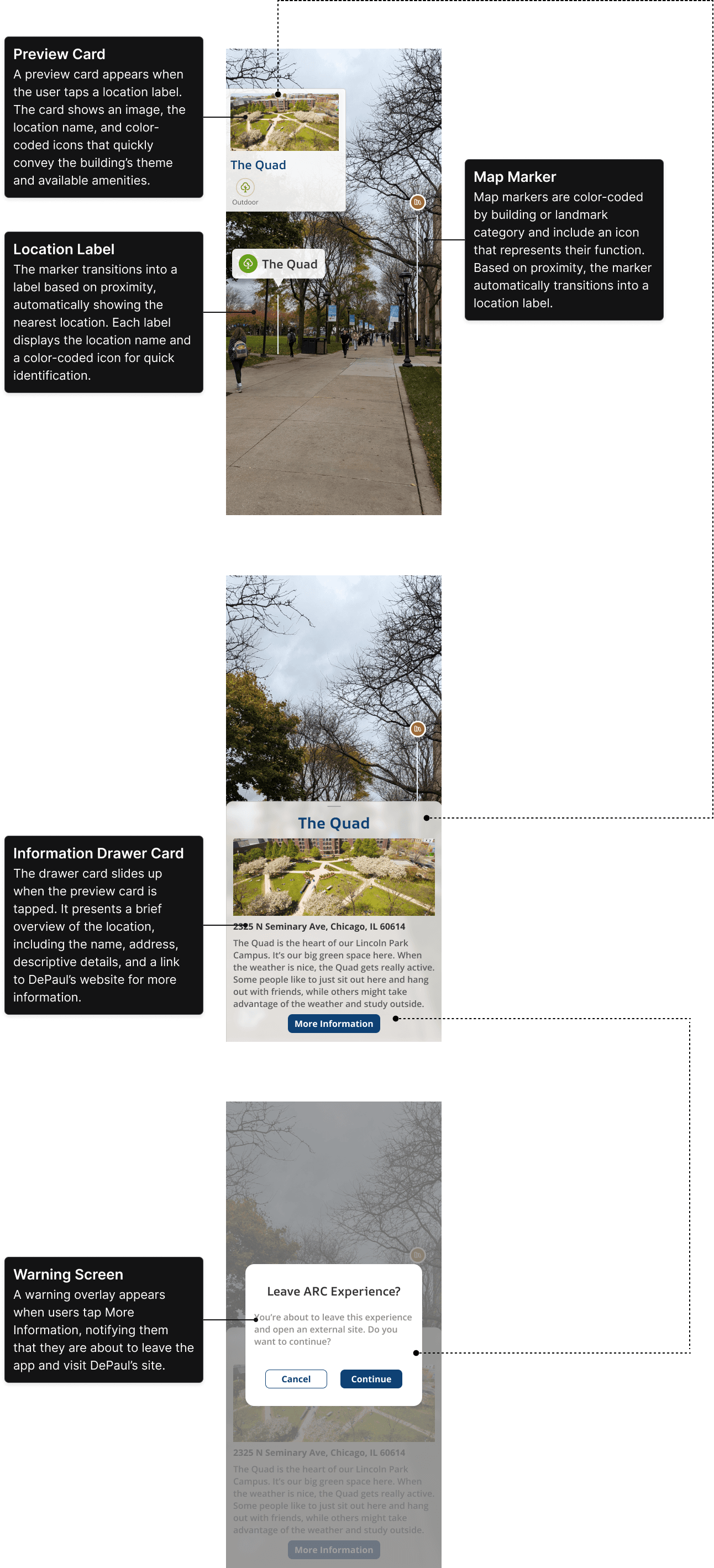
Early concepts explored proximity-based labels and preview cards to surface nearby campus information.
Early concepts explored proximity-based labels and preview cards to surface nearby campus information.
I mocked up the key components in Figma to explore the first three core features:
I mocked up the key components in Figma to explore the first three core features:
Building information
Building information
Internal resources
Internal resources
Statue information
Statue information
At this stage we experimented with proximity-triggered labels that highlighted nearby buildings and landmarks. The interaction flow also directed users to DePaul’s official tour website for additional information.
At this stage we experimented with proximity-triggered labels that highlighted nearby buildings and landmarks. The interaction flow also directed users to DePaul’s official tour website for additional information.
DESIGN TRADEOFF
DESIGN TRADEOFF
Technical constraints led us to simplify the interaction model and prioritize faster access to information.
Technical constraints led us to simplify the interaction model and prioritize faster access to information.
As the design evolved, technical constraints required simplifying the experience. The proximity-trigger feature proved too complex to implement within our timeline, which prompted a redesign of the interaction model.
As the design evolved, technical constraints required simplifying the experience. The proximity-trigger feature proved too complex to implement within our timeline, which prompted a redesign of the interaction model.
I removed labels and preview cards and updated the flow so tapping a map marker opens the information card directly. This reduced interaction steps and made information faster to access.
I removed labels and preview cards and updated the flow so tapping a map marker opens the information card directly. This reduced interaction steps and made information faster to access.
I removed external links to DePaul’s tour website to prevent disruptive context switching and keep users within the experience.
REFINEMENT
REFINEMENT
The refined interface prioritized readability and discoverability for outdoor AR use.
The refined interface prioritized readability and discoverability for outdoor AR use.
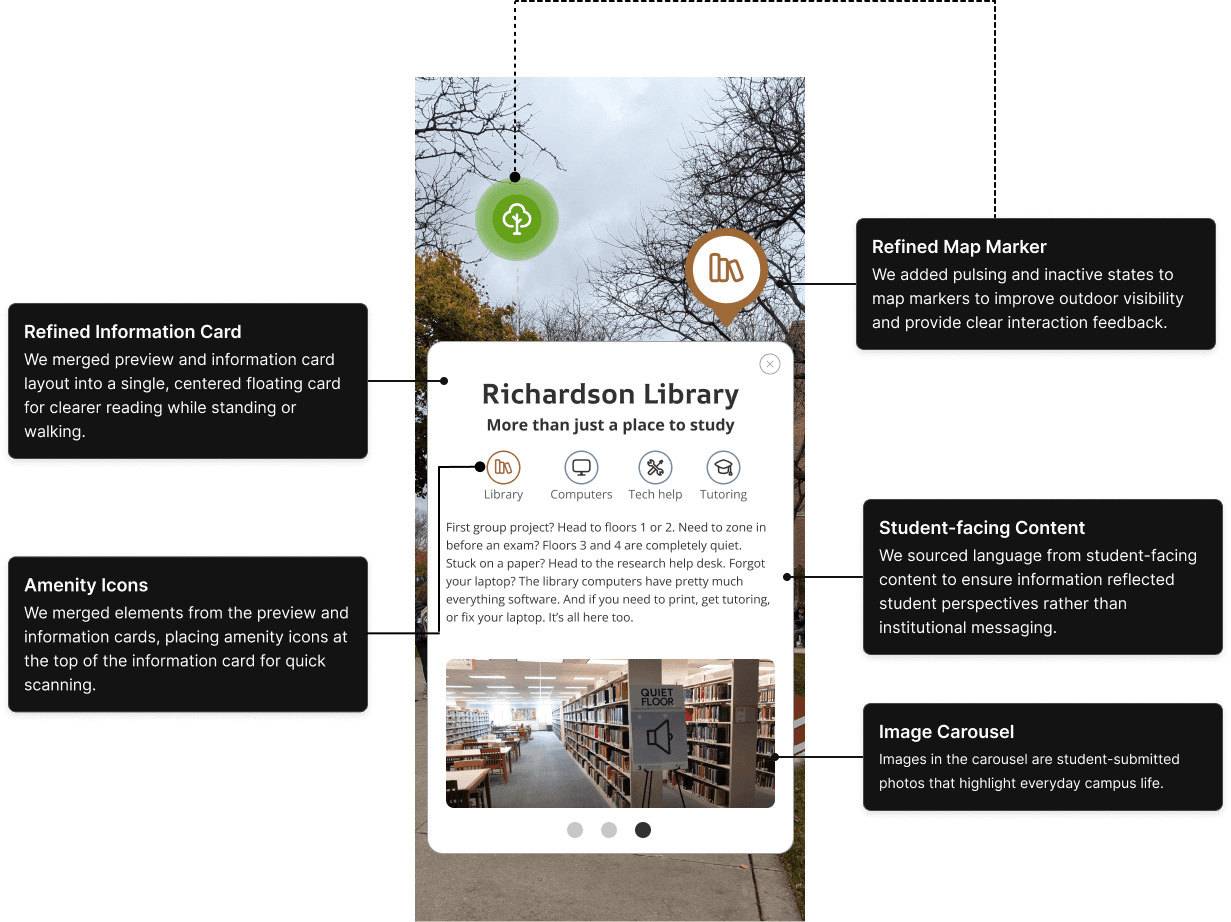
These design decisions resulted in a simplified interface optimized for outdoor visibility and quick information access while walking. The annotated mockup highlights the key UI updates.
These design decisions resulted in a simplified interface optimized for outdoor visibility and quick information access while walking. The annotated mockup highlights the key UI updates.
PROTOTYPE
PROTOTYPE
Once the core features were defined, I expanded the experience to include safety and transportation features.
Once the core features were defined, I expanded the experience to include safety and transportation features.
With the first three core features established, I designed the remaining two features including shuttle stop information and campus safety blue light.
With the first three core features established, I designed the remaining two features including shuttle stop information and campus safety blue light.
I then created a semi-interactive Figma prototype to illustrate the full experience.
Key elements include:
I then created a semi-interactive Figma prototype to illustrate the full experience.
Key elements include:
I then created a semi-interactive Figma prototype to illustrate the full experience.
Key elements include:
Pulsing Map Markers
Pulsing Map Markers
Categorical colors distinguish building and landmark types, while pulsing improves outdoor visibility.
Categorical colors distinguish building and landmark types, while pulsing improves outdoor visibility.
Information Cards
Information Cards
Short, student-oriented snippets designed to be readable while walking.
Short, student-oriented snippets designed to be readable while walking.
Amenity Icons
Amenity Icons
Icons within cards provide quick awareness of available resources.
Icons within cards provide quick awareness of available resources.
2D and 3D Assets
2D and 3D Assets
Campus-themed assets placed in front of buildings to highlight key locations and add visual delight.
Campus-themed assets placed in front of buildings to highlight key locations and add visual delight.
Shuttle Stops
Shuttle Stops
Clearly marked stops that help visitors understand inter-campus transportation options.
Clearly marked stops that help visitors understand inter-campus transportation options.
Beaming Safety Lights
Beaming Safety Lights
High-contrast signals that make campus safety call boxes easy to identify.
High-contrast signals that make campus safety call boxes easy to identify.
UNEXPECTED CONSTRAINT
UNEXPECTED CONSTRAINT
Building the AR prototype revealed real-world geospatial limitations that did not appear in earlier testing.
Building the AR prototype revealed real-world geospatial limitations that did not appear in earlier testing.
Using ARCore, Google’s Geospatial APIs, and Cesium SDK, the team built a working prototype web application.
Using ARCore, Google’s Geospatial APIs, and Cesium SDK, the team built a working prototype web application.
Unexpected Challenge
Unexpected Challenge
During on-campus testing, we discovered that geospatial anchors caused AR objects to appear several feet away from their intended locations. This issue had not appeared earlier because prior testing occurred in controlled environments rather than real campus conditions.
The discovery revealed how outdoor AR performance depends heavily on physical context and environmental conditions.
During on-campus testing, we discovered that geospatial anchors caused AR objects to appear several feet away from their intended locations. This issue had not appeared earlier because prior testing occurred in controlled environments rather than real campus conditions.
The discovery revealed how outdoor AR performance depends heavily on physical context and environmental conditions.
Field Testing Video
Field Testing Video
USER TESTING
USER TESTING
User testing showed that quick building information added the most value to the experience.
User testing showed that quick building information added the most value to the experience.
I conducted user testing on DePaul’s Lincoln Park campus with 4 participants interacting with the ARC app during a simulated campus tour. The goal of user testing was to understand how intuitive, enjoyable, and useful the designs were.
I conducted user testing on DePaul’s Lincoln Park campus with 4 participants interacting with the ARC app during a simulated campus tour.
Key Findings
Key Findings
Building information cards were the most helpful feature.
Building information cards were the most helpful feature.
Safety blue lights were least engaging.
Safety blue lights were least engaging.
Safety blue lights were least engaging.
Overall enjoyment was rated 3 out of 5, a neutral satisfaction.
Overall enjoyment was rated 3 out of 5, a neutral satisfaction.
Participants preferred independent exploration.
Participants preferred independent exploration.
Holding a phone mid-sidewalk felt socially awkward.
Holding a phone mid-sidewalk felt socially awkward.
Limitations
Limitations
Limitations
Technical Constraints
Technical Constraints
Anchor instability caused inconsistent AR placement, and 3D assets did not appear during testing, which prevented us from collecting feedback on them.
Anchor instability caused inconsistent AR placement, and 3D assets did not appear during testing, which prevented us from collecting feedback on them.
Non-representative Sample
Non-representative Sample
3 of the 4 participants were current students, and although I asked them to act as prospective students, their feedback reflected their existing familiarity with campus.
3 of the 4 participants were current students, and although I asked them to act as prospective students, their feedback reflected their existing familiarity with campus.
FUTURE OPPORTUNITIES
FUTURE OPPORTUNITIES
The project surfaced both design opportunities and technical constraints for future AR campus experiences.
The project surfaced both design opportunities and technical constraints for future AR campus experiences.
Insights from testing informed several priorities for future iterations.
Insights from testing informed several priorities for future iterations.
Explore alternative AR and location frameworks to improve anchor stability.
Explore alternative AR and location frameworks to improve anchor stability.
Emphasize independent and customizable tour experiences, supported by expanded personas.
Emphasize independent and customizable tour experiences, supported by expanded personas.
Prioritize information cards and deprioritize the safety light based on feedback.
Prioritize information cards and deprioritize the safety light based on feedback.
Introduce stationary physical markers to reduce disruption in public spaces.
Introduce stationary physical markers to reduce disruption in public spaces.
CONCLUSION
CONCLUSION
The project revealed both the potential and technical constraints of using AR for campus exploration.
The project revealed both the potential and technical constraints of using AR for campus exploration.
Impact
Impact
This project demonstrated that augmented reality can make campus exploration more personal by delivering concise, location-based information directly in the physical environment. At the same time, the work revealed geospatial anchoring limitations that must be addressed before AR experiences can reliably scale across campus environments, highlighting how technical constraints shape spatial design decisions.
This project demonstrated that augmented reality can make campus exploration more personal by delivering concise, location-based information directly in the physical environment. At the same time, the work revealed geospatial anchoring limitations that must be addressed before AR experiences can reliably scale across campus environments, highlighting how technical constraints shape spatial design decisions.
Retrospective
Retrospective
If I could do it again, I would test geospatial anchoring earlier through lightweight field deployments. Discovering these constraints sooner would have allowed the team to adapt the interaction model earlier. Leading this project also taught me the value of learning alongside a cross-disciplinary team, where close collaboration with engineering helps ensure design ideas remain grounded in technical feasibility when working with emerging technologies.
If I could do it again, I would test geospatial anchoring earlier through lightweight field deployments. Discovering these constraints sooner would have allowed the team to adapt the interaction model earlier. Leading this project also taught me the value of learning alongside a cross-disciplinary team, where close collaboration with engineering helps ensure design ideas remain grounded in technical feasibility when working with emerging technologies.